iPhone Duo
10 things we learned making a walking game for iPhone Duo
Short answer: a fold changes two things at once, the shape of the screen and the way you can play. Porting Chonky Corgo, our walking game, taught us to put our bars where iOS puts its own, to keep game state above anything a fold rebuilds, and to treat the hinge as a toy, never a button. All of it was tested on Apple's simulator. We had not held an iPhone Duo when we wrote this.
We make Chonky Corgo, a walking RPG where your daily steps charge attacks on pixel monsters. Apple started accepting iPhone Duo builds on 5 October 2026, and we spent 3 to 9 October porting the game. Version 2.1, with the Duo layouts, went to our testers as build 42 on 8 October. The App Store still had version 2.0.0 on 9 October.
This is the honest diary of that week: what broke, what we changed, and the rules we now follow. Every lesson comes from our own notes and code, checked on the iOS 27.1 iPhone Duo simulator. None of it had run on real hardware when we wrote this. iPhone Duo did not go on sale until 23 October.
What did porting a game to iPhone Duo involve?
Porting Chonky Corgo meant rebuilding the layout for six positions and adding a new way to play. We checked 45 screens in five positions, 225 captures in all, and a text scan found no clipped words. Six separate code reviews found about 75 issues in round one. At sign-off, 1,182 logic tests passed.
The numbers below are the ones we measured on the simulator and kept coming back to. Apple may tune any of them on the real phone, so treat them as a starting point, not a spec.
| Measurement | Value | Why it mattered |
|---|---|---|
| Side slot a hidden navigation bar still reserves | 84 pt | Pushed pages showed a blank strip down one side |
| Where iOS starts the side bar's items, closed screen | 170 pt from the top | It already clears the camera and the status bar |
| Where iOS starts the side bar's items, open and held sideways | 120 pt from the top | No hand-made numbers in our bar column |
| Width of the fold band on the open screen | 40 pt | Two pages split at it, flat or folded |
| Hinge angle where the simulator's book pose rests | about 127.5 degrees | Every Playtime toy works between about 100 and 180 |
| Time between hinge readings while folding | about 17 to 150 ms | Too often to redraw the whole app each time |
What did the new screen shapes teach us?
The screen lessons were mostly about where things go. On iPhone Duo, iOS moves toolbars and tab bars into a column on the side whenever the phone is closed or the inner screen is held sideways. Four of our ten lessons come from learning to live with that column.
1. Follow Apple's own apps, even when your idea feels smarter
Our first guess put pop-up cards on the top page when the phone stands half folded like a laptop. Then we checked where iOS puts its own pop-ups in the same pose. Alerts, share sheets and permission prompts all sit on the bottom page. We moved ours there the same day, 5 October, and it became a house rule: check what Apple does before inventing a Duo behaviour.
Apple's design guidelines for iPhone Duo say it plainly: 'In general, don't override the default bar placement.' People learn the phone from Apple's apps first. An app that does something else feels broken, even when its idea is reasonable.
2. Put your bars where iOS puts its own
Chonky Corgo draws its own pixel-art bars, and we wanted to keep them. So we kept the look and moved the place. Closed, or open and held sideways, Chonky's Back button, Rewards bell and four tabs now sit in the side column, with the tabs in a brown capsule like the dock turned on its side. Held upright, the normal top bar and bottom dock come back.
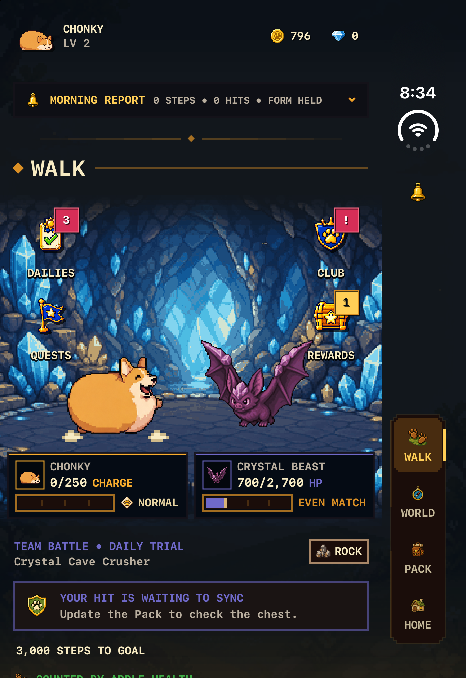
We stopped measuring by hand, too. UIKit reports where the side bar's items belong, and our column reads that instead of guessing. On 8 October Russell asked whether the icons could be more centred on the Wi-Fi icon above them. The bell and the tabs sat 6 pt inward. Now every item is centred on that line, within 0.5 pt on 18 of 18 page captures.
3. A hidden navigation bar still takes up space
Chonky hides every system navigation bar so it can draw its own. On iPhone Duo, iOS 27.1 still kept the hidden bar's slot: an 84 pt strip down the side of every pushed page, empty and black. The fix was to tell each page it has no side bar at all, and later to fill that slot with our pixel column on purpose.
One page slipped through until the 7 October launch check. Onboarding on the closed screen was laid out 84 pt too narrow and pushed to one side. If your app hides system bars, look for that number on iPhone Duo.
4. Split View's left half caught us out
This one was a real bug in the build our testers had, 2.1.0 (42). With Chonky in the left half of Split View on the open phone, the window reserved no space on that edge. UIKit still placed its bar area 84 pt in, past our column. So the tabs, Back button and bell drew on top of the page. A swipe back from the screen edge also started on the column and did nothing. The right half and full screen were fine.
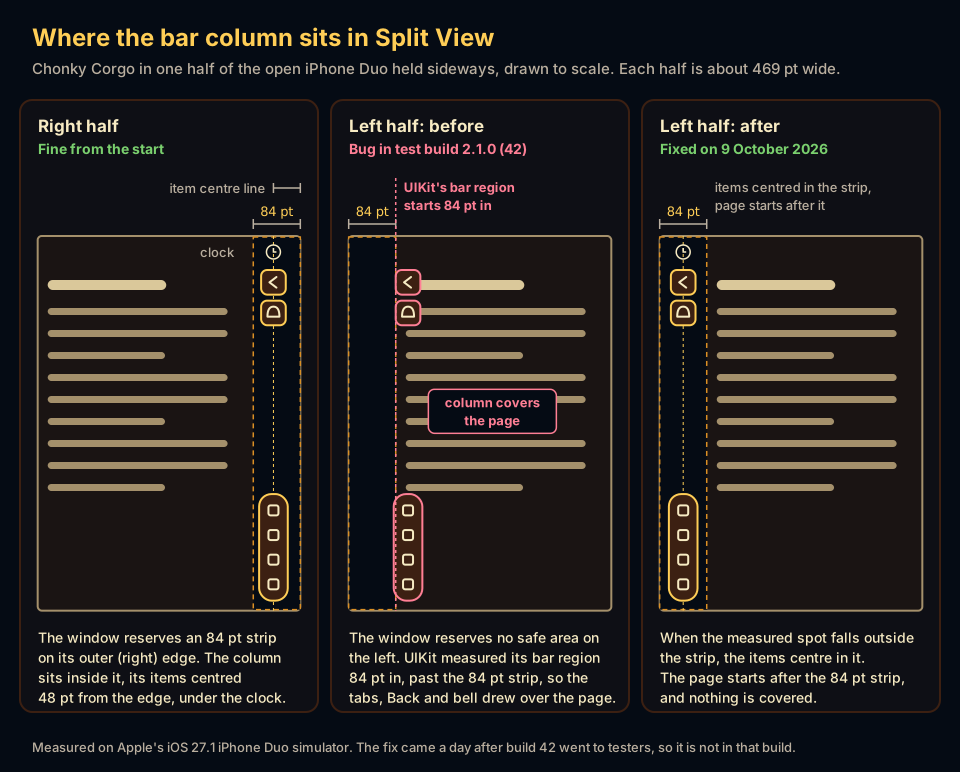
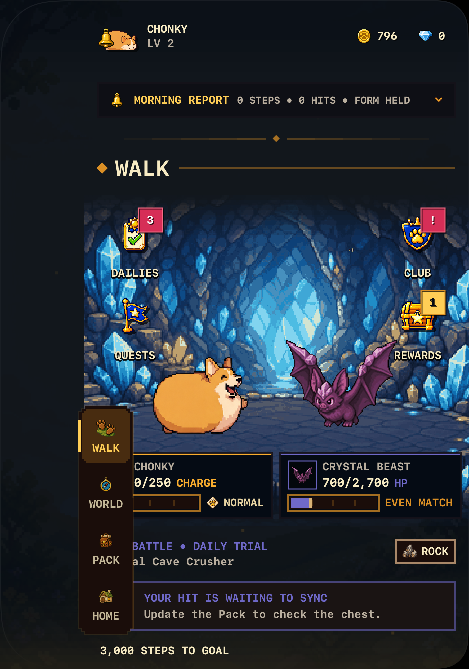
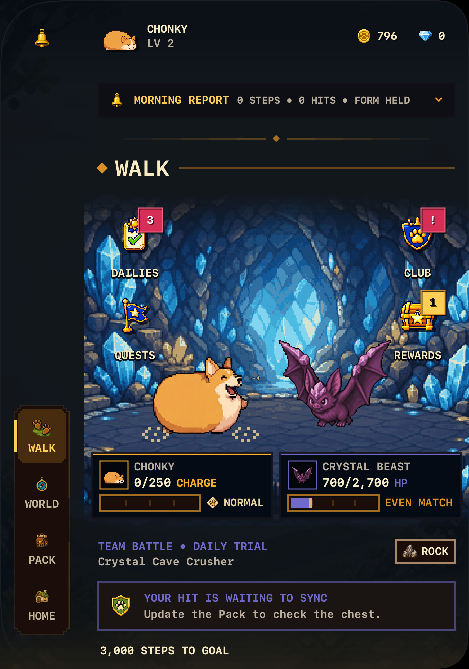
We found both on 9 October and fixed them the same day. For the column: when the measured spot falls outside the column, centre the items in the column. Both fixes came a day after build 42 went to testers, so on 9 October they were in our code but not in a test build. Lesson: test both halves of Split View, not just one. Our Split View guide shows how to put an app in each half.
5. Folded shut means portrait, on purpose
On 6 October we decided the closed phone shows Chonky in portrait only, however you hold it. Apple's guidelines allow it for games: 'You can choose to lock to either portrait or landscape orientation, but be sure to fill the screen as the device pose changes.' Our app lists only portrait, and the closed screen follows that.
The open inner screen does not follow it, because in iOS 27 the orientation setting is only a preference for windows that can change size. Held sideways, the open phone gives Chonky two pages side by side, such as the battle beside your day. A screen with only one page shows a window onto Pawville, Chonky's town, on the right page.
What did the hinge teach us?
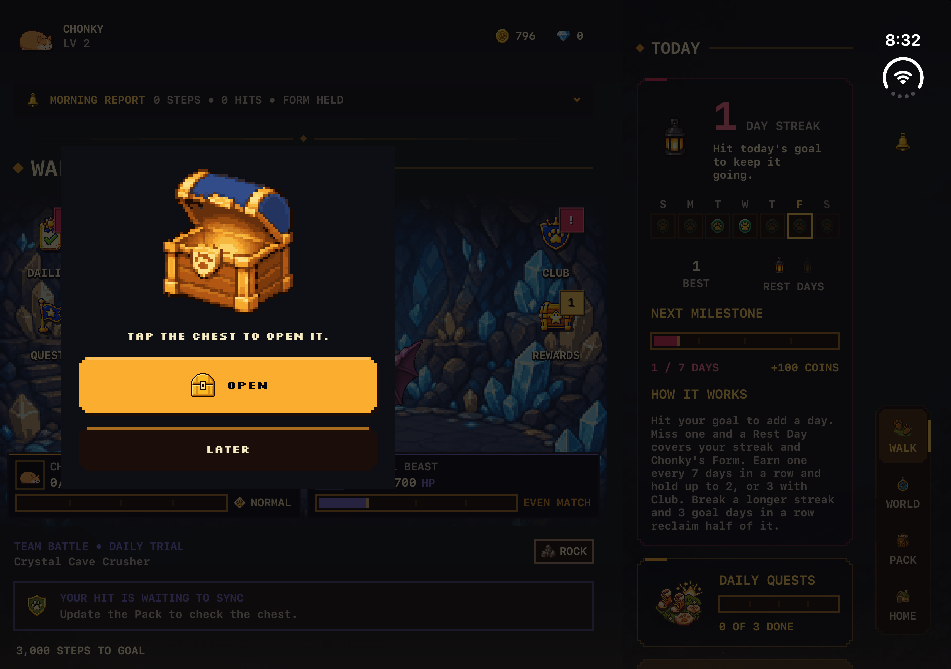
The hinge lessons were about trust. The hinge is a new controller, but it reads differently lying flat, it fires many times a second, and a fold can rebuild the very screen that is listening to it. Our version 2.1 uses the hinge in two places: Playtime's 11 fold toys and a treasure chest that opens with the phone.
6. The flat hinge hides unless you ask for it
iOS reports the fold as a 40 pt band you should keep things out of. But it marks that band active only while the phone is folded. Lying flat, the plain request returns nothing. You have to ask for inactive regions too, with the option .includeInactive.
Before we knew, the flat screen split our two pages at 514 and 421 points, and the folded screen split them at 455 and 455. Every fold re-laid out the whole scene. Now both states find the same seam, so folding moves nothing on screen. Our screen sizes cheat sheet has the band's position in every pose.
7. A fold rebuilds your screen, so keep state above it
When the phone folds or unfolds, iOS gives the app a new window shape and SwiftUI builds the page again. Our first Playtime kept each toy's progress in the page, so a fold wiped it: the score, the open curtains, the treats, the fire. The banner ad was also requested again on every fold. Both now live above the layout, in objects a fold does not touch.
The sneakiest case came up at sign-off on 8 October. Held upright, folding the phone to play a toy also crossed iOS's fold line, which moved the page to the lower half and rebuilt the toy mid-throw. Now, while a toy follows the hinge, the page holds still.
8. The hinge is a toy, never a button
We never let the hinge buy, delete or reset anything. The treasure chest only reveals a reward the game already gave you, so opening it twice, or a crash mid-opening, can never pay twice. Every Playtime toy plays between about 100 and 180 degrees, needs no exact angle, and also works by touch. 'Use Touch Instead' turns the hinge off for any toy.
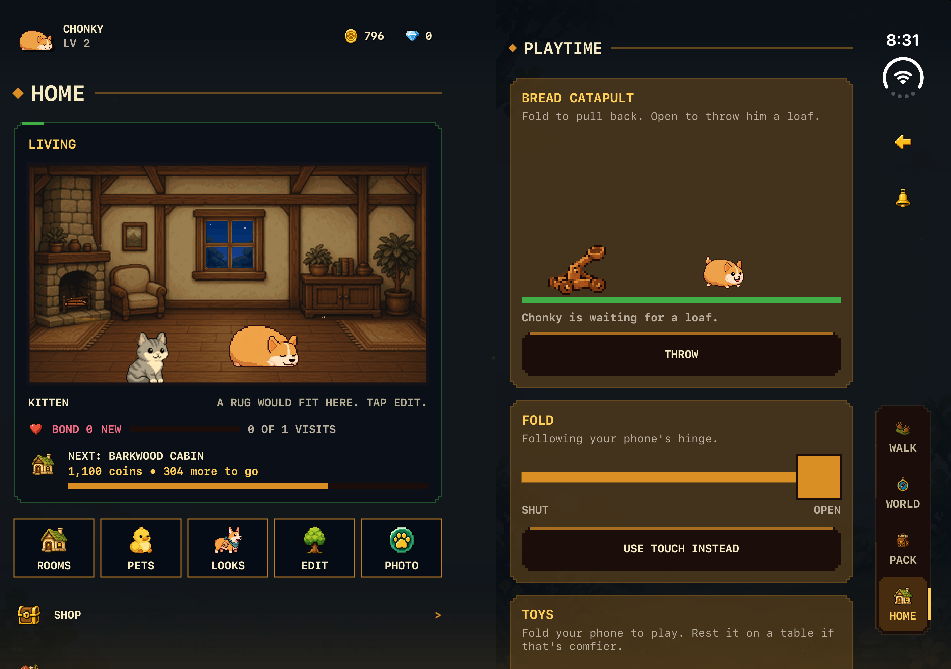
That same rule makes the toys work on every iPhone. Without a hinge, a Fold slider stands in for it, so Bedtime, the Bread Catapult and the rest of the 11 toys are not locked to one phone.
9. Keep hinge readings local, and do not trust a quiet hinge
Our first build held the hinge reading at the top of the app. Every reading, every 17 to 150 ms while folding, redrew the whole app. Now only the chest, the toys and Chonky's small settle on the Walk screen listen. After the change, our test screen still got 54 readings in one fold cycle, and the chest opened once.
The simulator also goes silent when the hinge holds still. A rule like 'no reading for half a second means the player stopped' would have restarted the chest after every pause. So the chest now starts over only for a real reason, such as the phone closing or the app leaving the screen.
What did testing without a device teach us?
Testing taught us that the tools were the slow part. The simulator was our only iPhone Duo, and it cannot fold itself from a script. So we built our own way to drive it, and we kept a list of what it can never show.
10. When the simulator has no remote, build one
Apple's simctl command line has no fold command, and Device Hub, the app that shows the simulator, offers no scripting. So we wrote a small script that photographs Device Hub's window, finds the fold buttons by their colour, clicks them, and photographs again to confirm the pose changed. It reads on-screen words with Apple's text recognition, so it can tap a button by its label.
It earned its guard rails the hard way. Device Hub sometimes froze on an old picture, so the script now compares it with a fresh screenshot and refuses to tap a stale screen. We also kept one named simulator per work session, so a fold never landed on another test run.
What still needs a real iPhone Duo?
The feel of the hinge needs a real phone. So do sound, glare, the real camera position, battery life and smooth frame rates. The simulator also uses the Mac's keyboard, so we never saw the on-screen keyboard in any pose. Two keyboard fixes rest on layout maths and unit tests until we can try them by hand.
That is the tradeoff of shipping early. Version 2.1 brings two pages side by side, the Pawville window, Playtime's 11 fold toys and the hinge treasure chest, all tested on a simulator rather than a phone. Some ideas stay switched off until we can try them on real hardware. For the other apps that support the device, see our list of the best iPhone Duo apps.
What else do people ask?
Three questions players and other developers ask us about Chonky Corgo on iPhone Duo. The answers describe our own builds as of 9 October 2026, when version 2.1 was still in testing, so check the App Store listing for the version you can download today.
- Is Chonky Corgo's iPhone Duo version out yet?
- Not on 9 October 2026. The App Store had version 2.0.0, which came out before Apple accepted iPhone Duo builds. The Duo layouts, Playtime and the hinge chest are in version 2.1, which was in testing as build 42.
- Did you test Chonky Corgo on a real iPhone Duo?
- No. Nobody could buy one before 23 October 2026, so every check ran on Apple's iOS 27.1 iPhone Duo simulator. The hinge feel, sound, glare and battery use still need a real phone.
- Do Playtime's fold toys need an iPhone Duo?
- No. On an open iPhone Duo the toys follow the hinge. On every other iPhone, and on the closed Duo, you drag a Fold slider instead. Every toy also answers a tap or a button.