iPhone Duo
11 things a corgi does when you fold your iPhone Duo
In Chonky Corgo's Playtime, folding your iPhone Duo plays 11 small toys. Fold slowly and Chonky gets tucked into bed. Fold and open to throw him a loaf, play a tune, puff up a campfire or breathe with him. On other iPhones a Fold slider does the same job. On 9 October 2026, Playtime was in testing for version 2.1, and the App Store version, 2.0.0, did not have it.
An iPhone Duo folds in the middle. Most apps treat that hinge as something to keep buttons away from. We wanted to see what happens if a corgi treats it as a toy. The answer is Playtime: 11 tiny games inside Chonky Corgo, each one played by opening and closing the phone.
A disclosure first: we make Chonky Corgo, so this is a tour of our own work. On 9 October 2026, Playtime was in testing for version 2.1 (TestFlight build 42). The App Store version that day, 2.0.0, came out on 30 September and does not include it. Everything below comes from that test build, and every toy is free to play.
What does folding an iPhone Duo do in Chonky Corgo?
Folding plays a toy. Open Home, tap PLAYTIME, pick one of 11 toys, and the hinge becomes the controller. Every toy works between about 100 and 180 degrees, so the inner screen stays easy to read. No toy needs an exact angle, a hard fold or a fast one. Every toy also answers a tap, a button or a slider.
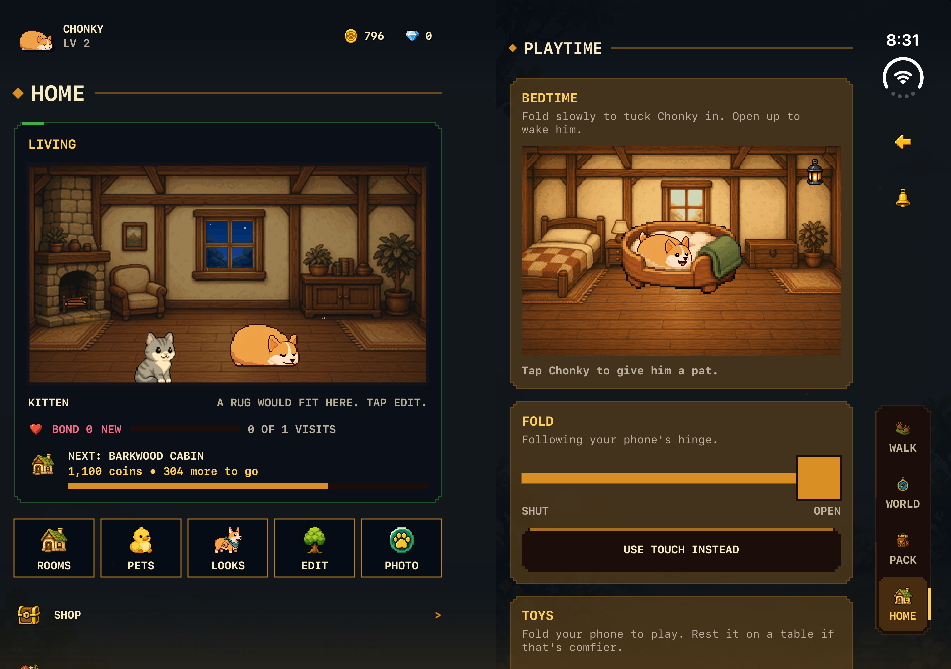
The toys are play only. They give no steps, Coins, loot or combat power, and they save nothing. Your catches and calm breaths last until you pick another toy or quit the app. That was on purpose: a toy you can enjoy for ten seconds should never feel like a chore you have to finish.
| Toy | What the fold does | Without the fold |
|---|---|---|
| Bedtime | Folding dims the room in 4 steps and pulls the blanket up until Chonky sleeps | Tap Chonky for a pat |
| Bread Catapult | Fold to pull back, open to throw a loaf. A deeper pull throws further | Throw button |
| Squeezebox | Each pleat of travel plays the next of 12 notes | Tap to play the current note |
| Peekaboo | Half open he hides. Open further and he peeks, then pops up | Knock on the fold |
| Snack Valley | Half-folding tips both pages, and treats roll down to Chonky | Tap a treat to push it |
| Campfire | Each small fold and reopen is one puff that grows the fire | Tap the fire |
| Sunrise | Opening moves Pawville from midnight to midday | Drag the Fold slider |
| Pop-up Pawville | Opening stands the town up in 3 paper layers | Drag the Fold slider, then tap Chonky |
| Press a Monster | From fully open, fold 45 degrees to press a monster | Press and Next Monster buttons |
| Curtain Call | Fold a little, then open 40 degrees to draw the curtains back | Open Curtains and Next Look buttons |
| Breathe with Chonky | Open as he breathes in, fold a little as he breathes out | Start a Calm Minute, then the Fold slider |
What are the 11 fold toys?
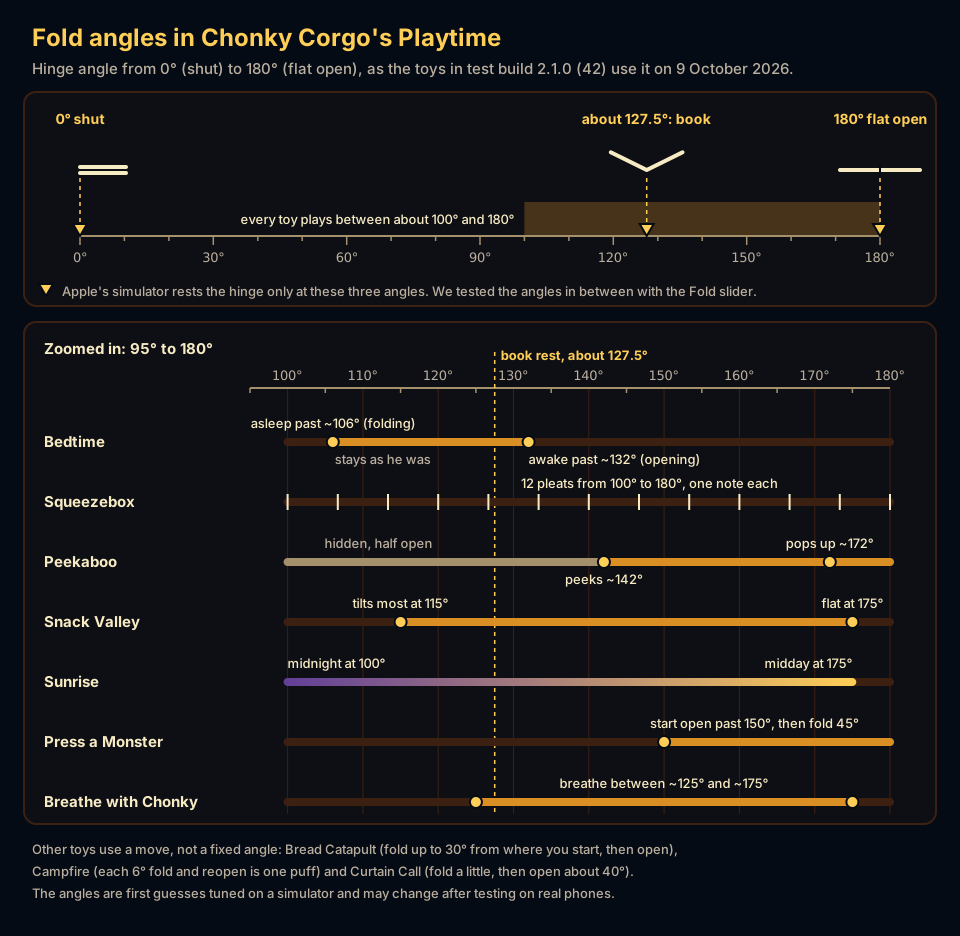
Here is each toy, in the order the Playtime list shows them, with the angles our code uses. The angles are the ones in the test build, counted from 0 degrees for a shut phone to 180 for a flat one. We may tune them once people try the toys on real phones.
1. Bedtime
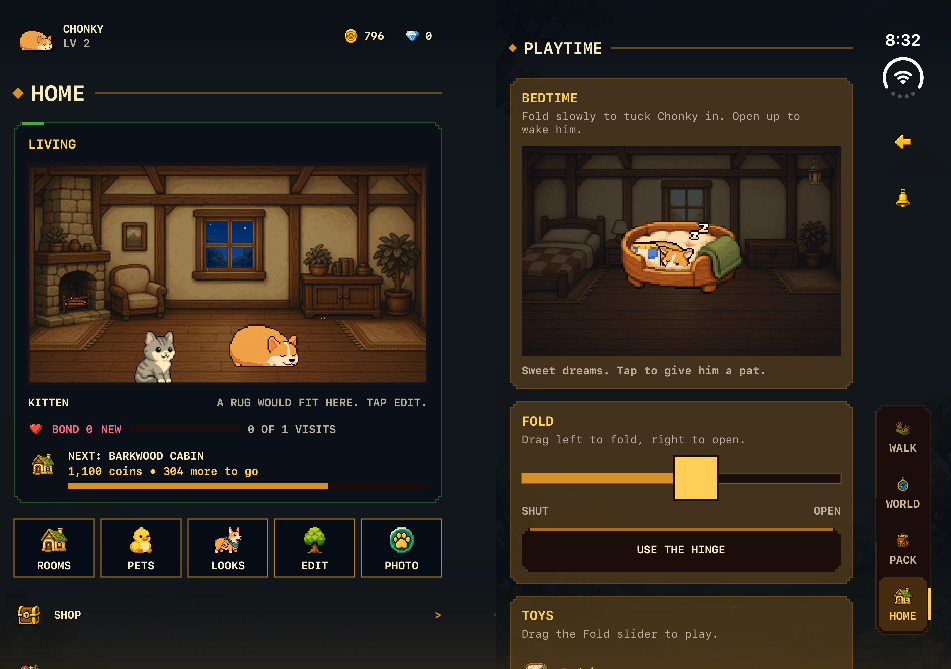
Bedtime is the gentlest toy. Fold slowly and Chonky's room darkens in 4 steps, the lantern dims and the blanket rises over him. Past about 106 degrees he falls asleep. He wakes again only past about 132 degrees, so he stays asleep when the phone rests half open on a table in the book pose. Close the phone completely and he is still asleep on the outer screen. Tap him for a pat. A sleepy pat makes a softer sound.
2. Bread Catapult
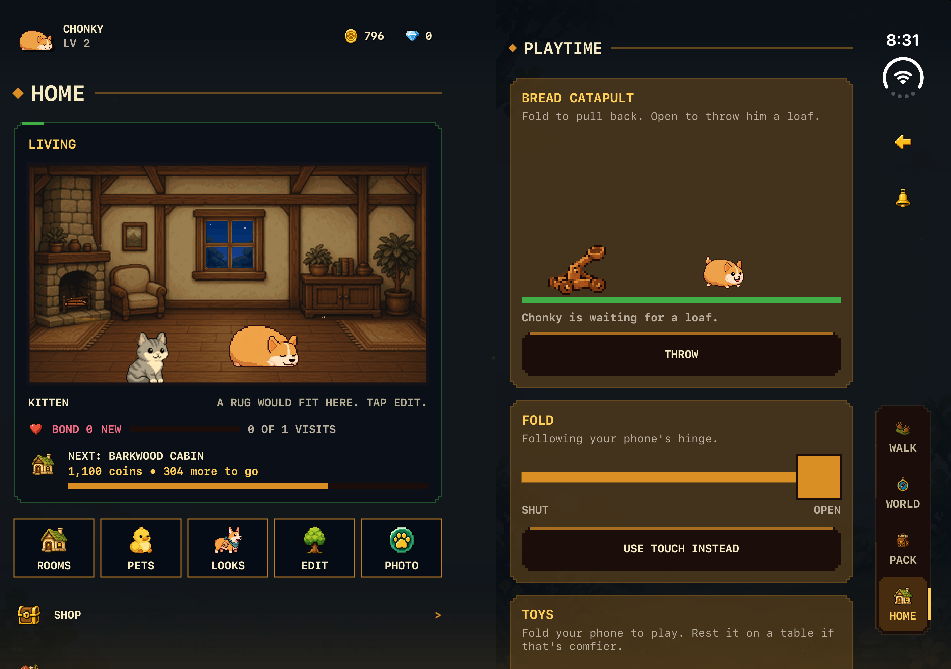
Bread Catapult is the toy we played most while testing. Fold up to 30 degrees from where you start to pull the catapult back, then open to throw a loaf. The deeper you pull, the further it flies. Chonky waits at one of three spots, close by, in the middle or far away, and he moves after every throw. The toy tells you if you were short or long, and keeps count, such as 2 of 3 caught.
3. Squeezebox
Squeezebox turns the hinge into an accordion. Between 100 and 180 degrees there are 12 pleats, and each pleat plays the next note of a two-octave pentatonic scale. Pentatonic means 5 notes per octave that all sound nice together, so any speed of folding sounds like a little tune. A phone resting on a pleat edge does not play notes on its own. Tap the squeezebox to play the note you are on.
4. Peekaboo
Peekaboo hides Chonky behind the crease. Half open, like a book, he is out of sight. Open past about 142 degrees and he peeks over the fold. Open past about 172 degrees and he pops up with a sparkle. On a phone that does not fold, knock on the fold drawn on screen and he peeks for 1.2 seconds.
5. Snack Valley
Snack Valley makes the crease a little valley. The pages lie flat at 175 degrees and tilt most at 115. Fold the phone part way and the treats on both pages roll down to Chonky, who waits in the middle and eats them. Open the phone all the way to set out a fresh plate of 3 treats. When the plate is empty the toy goes quiet, so a phone left half folded does not munch forever.
6. Campfire
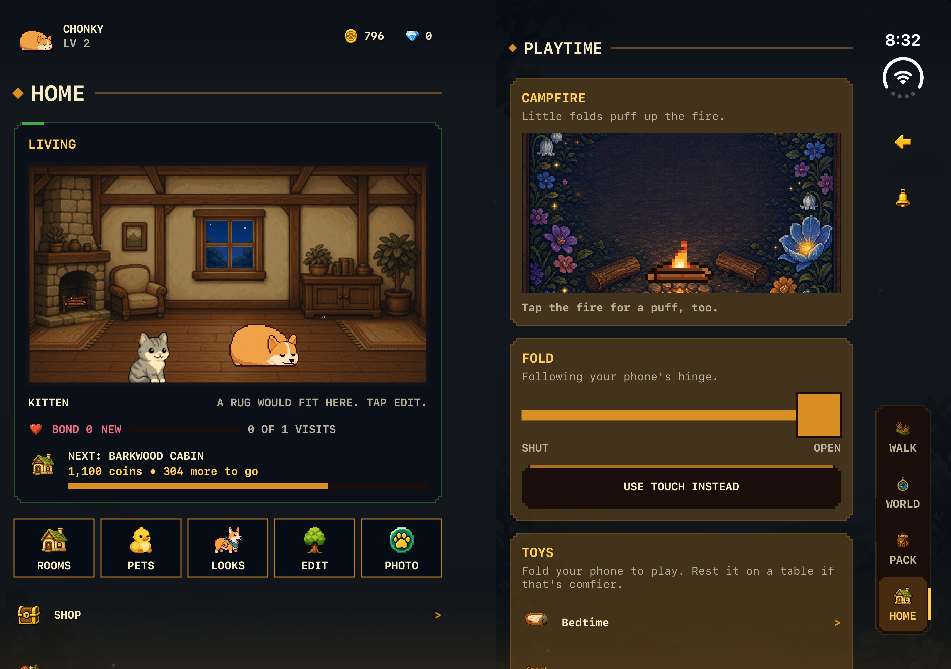
Campfire works like old bellows. Each small fold and reopen of 6 degrees is one puff, and each puff grows the fire one size, up to 3. Speed does not matter, only the movement. Stop and the fire settles back to a small flame. It never goes out, so you never come back to cold logs. Tap the fire for a puff, too.
7. Sunrise
Sunrise is a time machine for Pawville, Chonky's home town. Open the phone from 100 to 175 degrees and the town goes from midnight through dawn, morning and late morning to midday, using 5 of the game's time-of-day paintings. It is just for fun: the game's own clock does not change.
8. Pop-up Pawville
Pop-up Pawville is a pop-up book. As you open the phone, Pawville stands up in 3 paper layers, back first: the town painting, then the bakery awning, the postbox tower and the flower cart, then the trees and Chonky in front. Fold it down and the layers lie flat again. Tap Chonky when he is up and he hops.
9. Press a Monster
Press a Monster works like pressing a flower in a book. Start with the phone open past 150 degrees, then fold 45 degrees and the page lowers onto a monster you have met. At the end it is pressed with a stamp. Before you meet your first monster, the Tutorial Slime stands in. Press and Next Monster buttons do the same without folding.
10. Curtain Call
Curtain Call is a tiny stage show. Fold a little, then open about 40 degrees, and the curtains draw back on one of Chonky's starter looks. Ta-da. Tap Next Look for another outfit, or Open Curtains to skip the fold.
11. Breathe with Chonky
Breathe with Chonky is a calm minute, 60 seconds long. Each breath takes 8 seconds: 4 in and 4 out. Open the phone as Chonky breathes in and fold it a little as he breathes out, between about 125 and 175 degrees. A gold marker shows his breath and a green one shows yours. The toy counts calm breaths when you match him for most of a breath. There is no score, and nothing to lose.
Can you play the fold toys without an iPhone Duo?
Yes. On every other iPhone, and on a closed iPhone Duo, each toy plays with a Fold slider. Drag it left to fold and right to open, from SHUT to OPEN. The slider uses the same angles as the hinge, so a toy behaves the same either way. The test build starts on Bedtime with the slider at 150 degrees.
On an open iPhone Duo there is also a Use Touch Instead button. It is there for anyone who would rather not fold, or whose phone sits in a stand. Tap it and the slider takes over, starting at the hinge's current angle so the toy does not jump. Tap Use the Hinge to switch back. If you close the phone mid-toy, the slider takes the last hinge angle, which is why a tucked-in Chonky stays asleep.
VoiceOver can play too. The toy stages have spoken names, such as "Chonky is awake in his bed", and the ones you tap have a VoiceOver action. The Fold slider moves in 10-degree steps when you swipe up or down on it.
What changes when Reduce Motion is on?
With Reduce Motion on, the toys still work, but they move less. Playtime follows the iPhone setting in Settings > Accessibility > Motion, and Chonky Corgo's own Reduce Motion switch in its Settings. Either one turns off the extra movement and keeps the toy.
- Chonky no longer hops when you pat him or tap the squeezebox.
- The catapult loaf flies flat and lands in 0.2 seconds instead of arcing for 0.7.
- The campfire stops flickering and throws no sparks. It still grows and shrinks with each puff.
- In Breathe with Chonky, Chonky holds still. The gold marker still shows when to breathe in and out.
What did we not know about the fold toys when we wrote this?
How they feel in a real hand. We built and checked every toy on Apple's iPhone Duo simulator, because nobody could buy the phone before 23 October 2026. That simulator rests the hinge at only three angles: shut, about 127.5 degrees and fully open. So we tested the angles between with the slider.
That is the honest tradeoff. The angles in this article, like 106 degrees for Bedtime, are first guesses tuned on a simulator. Some may change after testing on real phones. When we wrote this, we had not heard the squeezebox through a real iPhone Duo speaker. If a toy feels off on your phone, the slider is always there.
Playtime is one of three iPhone Duo features in the 2.1 test build. The other two are two pages side by side on the open screen, with a window onto Pawville beside screens that have one page, and a treasure chest in the rewards inbox whose lid follows the hinge. For other games that use the hinge, such as Twofold and kami, see the best games for iPhone Duo. For apps beyond games, read the best apps for iPhone Duo.
What else do people ask?
Three questions we expect about Playtime, the fold toys inside Chonky Corgo. The answers describe TestFlight build 2.1.0 (42) as it stood on 9 October 2026. Versions change, so check the App Store's version history for anything newer before you rely on them.
- Is Playtime on the App Store yet?
- Not on 9 October 2026. That day the App Store version of Chonky Corgo was 2.0.0, from 30 September, and Playtime was in testing for version 2.1 (TestFlight build 42). Look for 2.1 or later in the app's version history.
- Do the fold toys give rewards or count toward my steps?
- No. The toys give no steps, Coins, loot or combat power, and they save nothing. Your catches and calm breaths stay on screen until you pick another toy or quit the app.
- Do I need an iPhone Duo to play the fold toys?
- No. On every other iPhone, and on a closed iPhone Duo, each toy plays with a Fold slider that uses the same angles as the hinge. Many toys also have a tap or a button.