
iPhone Duo
iPhone Duo poses explained: 7 ways to hold it and what apps do in each
Short answer: Apple's developer guide draws six iPhone Duo poses: closed, folded like a tent, open wide, partially folded like a book, open tall, and folded like a laptop. Turning the closed phone sideways makes a seventh. Apple does not want a custom design for each pose. Apps should resize, keep controls in the side column, and keep content off the fold.
iPhone Duo folds, so one phone can be a pocket phone, a small tablet, an open book, a tiny laptop or a bedside clock. Each of those is a pose, and each one changes the shape of the screen your apps get. Apple set 23 October 2026 as the on-sale date. We wrote this on 9 October from Apple's documents and Apple's iPhone Duo simulator.
Below are all seven poses, each with Apple's name for it, what Apple asks apps to do, and what one real app does. That app is Chonky Corgo, our walking game. We make it. Its iPhone Duo version is in testing for version 2.1, and the App Store version on 9 October 2026 was 2.0.0.
What are the iPhone Duo poses?
Apple's developer guide to preparing apps for iPhone Duo pictures six poses: closed, folded like a tent, open in a wide layout, partially folded, open in a tall layout, and folded like a laptop. Apple's design guidelines sum them up as partially folded like a book, placed down on a surface, or standing on its edges.
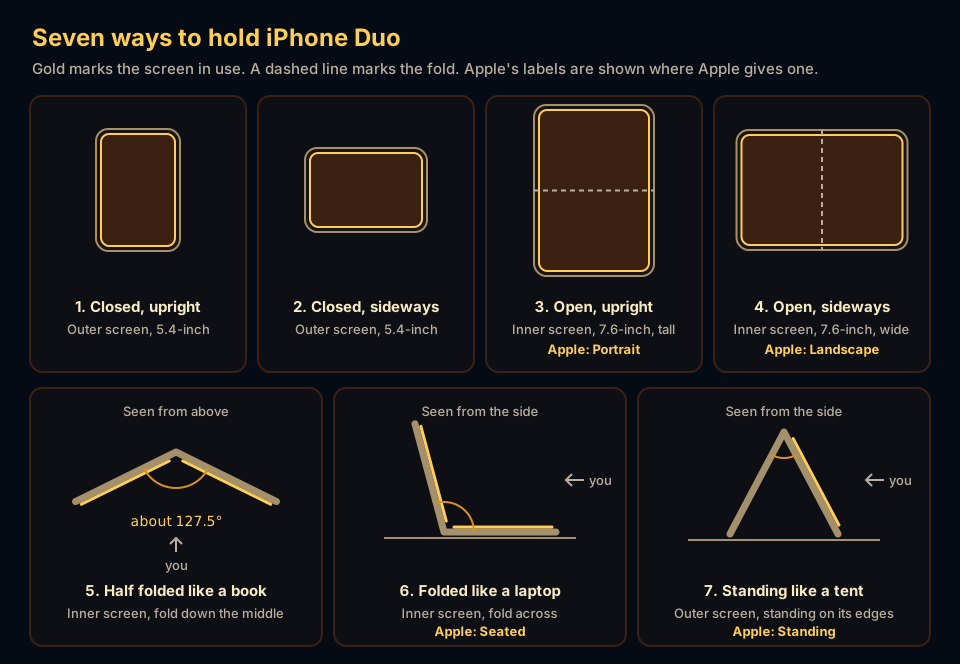
Apple's iPhone Duo page uses friendlier labels: Closed, Landscape, Portrait, Seated and Standing. We count the closed phone turned sideways as its own pose, because Apple's developer guide tells app makers to rotate iPhone Duo in each pose and check the layout. The table puts all seven side by side.
| Pose | Screen | What Apple says about it | What Chonky Corgo does (in testing for 2.1) |
|---|---|---|---|
| 1. Closed, upright | Outer, 5.4-inch | Toolbars and tab bars move into a column on the side | One page, with its tabs at the foot of the right-hand column |
| 2. Closed, sideways | Outer, 5.4-inch | Orientation works like any other iPhone | Stays portrait, so the picture turns sideways with the phone. Our choice, and a weak spot |
| 3. Open, upright (Apple: Portrait) | Inner, 7.6-inch, tall | Keeps the standard bars across the top and bottom | One page across the full width, with the top bar and bottom tabs |
| 4. Open, sideways (Apple: Landscape) | Inner, 7.6-inch, wide | Controls stay on the side. Show a second level of detail. Split View lives here | Two pages side by side, or one page beside a painted window onto Pawville |
| 5. Half folded like a book | Inner, fold down the middle | Keep content and pop-ups off the fold | The two pages meet at the fold. Playtime's toys follow the hinge |
| 6. Folded like a laptop (Apple: Seated) | Inner, fold across | Watch on the top half, with the controls on the bottom | The scene sits above the fold, the rest of the page below it |
| 7. Standing like a tent (Apple: Standing) | Outer, standing on its edges | StandBy, and shows at an adjustable angle | Nothing special yet. It stays portrait, so we expect it on its side. Our weakest pose |
1. Closed and upright: what changes?
Closed, iPhone Duo is a 5.4-inch phone, and the big change is the bars. Apple moves the status bar, toolbars and tab bars into a column on the right edge, so apps get more height for content. Apple's design guidelines use Mail as the model: closed, Mail shows either your list of emails or one email.

Chonky Corgo shows one page here. Its tabs sit at the foot of that right-hand column, where Apple puts a tab bar. Playtime's fold toys still work on the closed phone: you drag a Fold slider instead of bending the hinge. A reward chest opens with a tap here, and follows the hinge once the phone is open.
2. Closed and sideways: does the app turn?
It depends on the app. Apple's developer talk says interface orientation on the outer display behaves like any other iPhone, so an app that supports landscape turns and one that does not stays put. On Apple's simulator on 5 October 2026, the Home Screen and Settings stayed upright when we turned the closed phone, and Safari rotated.
Chonky Corgo stays upright here on purpose. Closed, it is a portrait game, so turning the phone turns the picture with it, the way the Home Screen behaves. That keeps one layout for the closed phone. It is still a real weakness if you like to hold a phone sideways.
3. Open and upright: is it just a bigger phone?
Mostly, yes. Opened upright, the 7.6-inch inner display is tall enough that Apple keeps the standard bars across the top and bottom instead of moving them to the side. Apple's design guidelines call this the one exception to the side column. Apple's iPhone Duo page pitches this pose for typing on a wider keyboard.

Apple's iPhone Duo page also shows a portrait trick here: pin a video to the top and use another app below it. Chonky Corgo keeps its normal top bar and bottom tabs in this pose, and its pages fill the full width with the usual margins instead of sitting in a narrow strip.
4. Open and sideways: what goes on the other half?
This is the pose that shows off the 7.6-inch screen. Apple keeps the bars in the side column and asks apps to show one more level of detail where it makes sense. Apple's example is Mail: one email when closed, then the list and the email side by side when open. Split View happens here too.
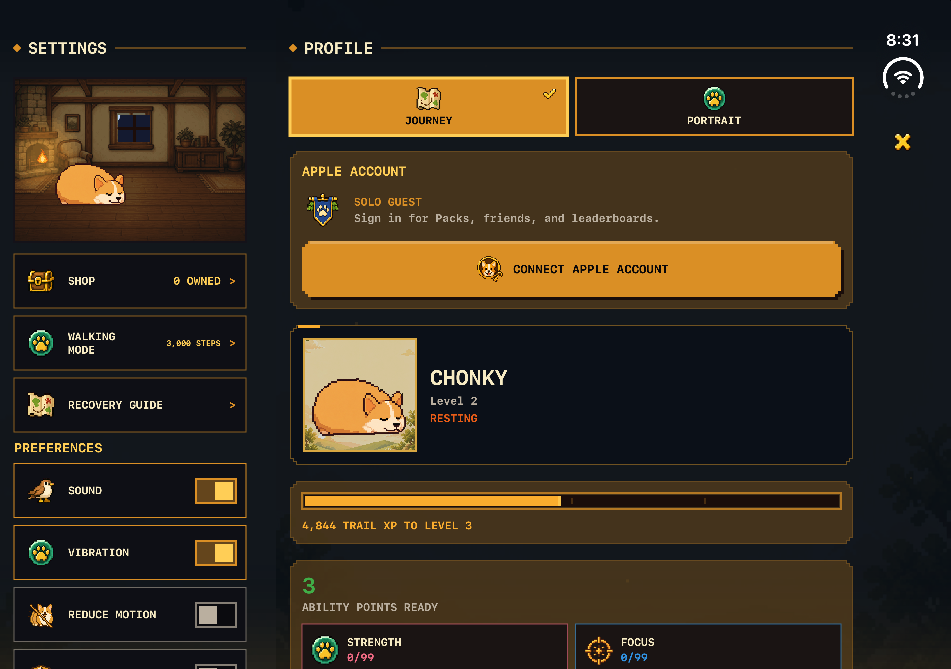
Chonky Corgo uses the width for two pages at once, such as the battle beside your day, or Chonky's room beside its list. A screen with only one page keeps the left half and gets a painted window onto Chonky's town, Pawville, on the right. To put a second app beside it instead, use Split View: Apple's developer talk says to drag the app by the home indicator to one side of the screen.
5. Half folded like a book: what about the crease?
Half folded with the fold down the middle, the screen becomes two pages, and Apple's rule is to keep important things off the crease. Apple's design guidelines point to Notes, whose split view adjusts each pane's width so both stay clear as the phone folds. Alerts, menus and sheets move off the fold by themselves.
On the simulator, Apple's own screens went further. The Spotlight keyboard split into two halves, one on each side of the fold, and Settings widened its sidebar so it ended exactly at the fold. Safari did nothing special: web pages ran straight across the crease.
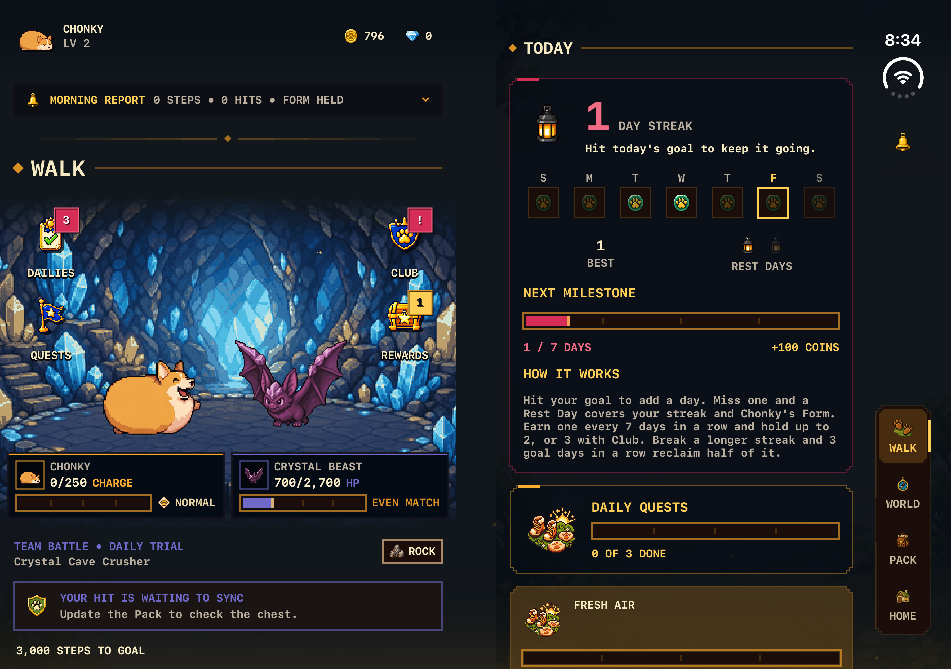
Chonky Corgo's two pages meet exactly at the fold, so nothing sits in the crease. This is also where Playtime's 11 toys come alive. Each one plays between about 100 and 180 degrees. In Bedtime, Chonky falls asleep when you fold past about 106 degrees and stays asleep until you open past about 132, so a phone resting like a book, about 127.5 degrees on the simulator, keeps him tucked in.
- Bread Catapult: fold to pull back, open to throw Chonky a loaf.
- Campfire: each small fold and reopen puffs up the fire.
- Peekaboo: the book pose hides Chonky, and opening makes him peek, then pop up.
- The treasure chest: a reward in the Rewards inbox opens in a chest whose lid follows the hinge as you open the phone.
6. Folded like a laptop: what goes on top?
Stand the phone upright and fold it so the bottom half lies flat, and you have a tiny laptop. Apple's iPhone Duo page calls this pose Seated: 'Set iPhone Duo down and watch a show or follow a workout at the perfect viewing angle', with the controls on the bottom. Apple's developer guide says 'folded like a laptop'.
On the simulator, Apple's system follows that split. With the fold across the screen, the Spotlight search field moved up above the fold and the keyboard filled the bottom half. Alerts and share sheets moved to the bottom half too.
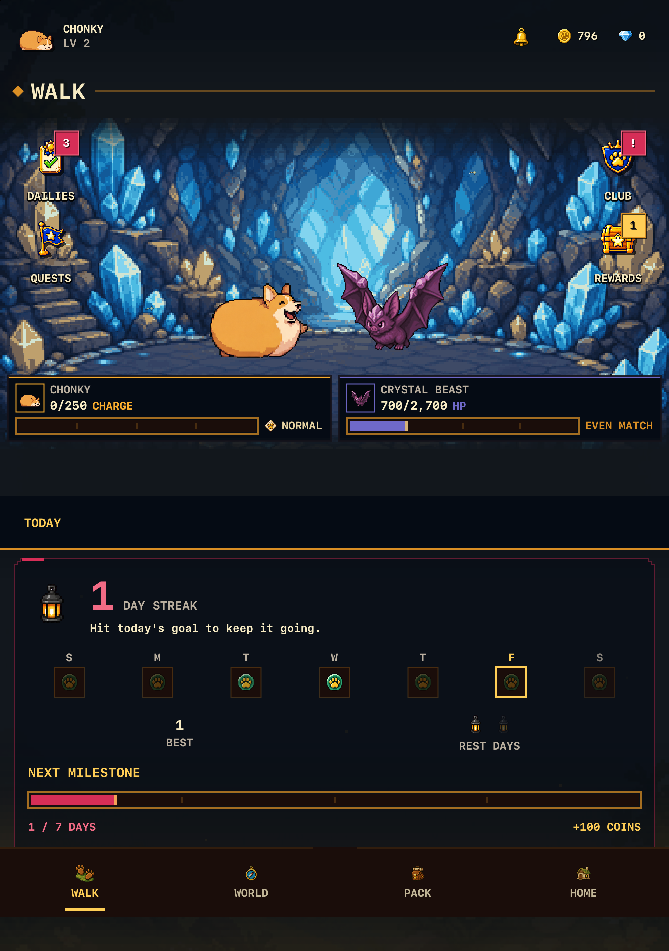
Chonky Corgo puts the thing you watch on the top half and the rest below the fold. On Walk, the battle sits on top. On Home, Chonky's room leads. Pop-up cards land on the bottom half, as Apple's alerts do.
7. Standing like a tent: is it just StandBy?
For most people, yes. Stand the folded phone on its two edges like a tent, and the outer display faces you. Apple's iPhone Duo page calls this pose Standing and pairs it with StandBy: a bedside clock, photos or widgets, even when the phone is not charging. Apple also mentions watching shows on it at an adjustable angle.
For app makers, Apple's developer talk says iPhone Duo is a great opportunity to support landscape orientation, because people may want to set the phone down like a tent.
This is Chonky Corgo's weakest pose. Chonky Corgo stays portrait on the outer display, so in a tent we expect it to sit on its side. We could not test that either: Apple's simulator offers closed, book and open, and no tent. For now, StandBy is the better use of a tent. For apps whose makers say in writing that they use these poses, see our list of iPhone Duo apps with confirmed support.
Can an app tell which pose you are in?
Not directly. In the iOS 27.1 tools we build with, an app can read the hinge and see where the fold and cameras cover the screen, but nothing says tent or laptop. Apple's design guidelines say that supporting the poses does not mean designing a custom layout for each one. Apps should use size classes and let the layout grow.
Don't reinvent your app when it resizes; allow the existing layout to expand based on the available space instead.
Apple Human Interface Guidelines, Designing for iPhone Duo
That is why Chonky Corgo reads the shape of its screen and the fold, not the pose. A laptop and a book are the same half-folded phone turned 90 degrees, so the same layout code handles both: pages stacked in one, side by side in the other.
What else do people ask?
Three questions people ask about the ways to hold iPhone Duo. The answers come from Apple's iPhone Duo page, announcement and developer guide, read on 9 October 2026, before anyone outside Apple had the phone. Check Apple's own pages again before you rely on any detail.
- How many poses does iPhone Duo have?
- Apple's developer guide draws six: closed, folded like a tent, open in a wide layout, partially folded, open in a tall layout, and folded like a laptop. Turning the closed phone sideways adds a seventh way to hold it. Apple's iPhone Duo page uses five labels: Closed, Landscape, Portrait, Seated and Standing.
- What is the difference between book and laptop on iPhone Duo?
- Both are the phone half folded. In the book pose you hold it sideways, so the fold runs down the middle like a book's spine. In the laptop pose it stands upright on a table with the fold across the screen, the top half for watching and the bottom half for controls.
- Does StandBy need a charger on iPhone Duo?
- No. Apple's iPhone Duo page says you can use StandBy just about anywhere, even when you aren't charging iPhone Duo. Apple's announcement says that when you set the phone down, StandBy works on either the outer or the inner display.