
iPhone Duo
How to use Split View on iPhone Duo: two apps side by side in 5 moves
Short answer: open iPhone Duo and hold it sideways. Pull the home indicator up from the bottom centre and the app shrinks into a card. Without pausing, slide the card to the left or right edge. It drops into that half, and the Home Screen fills the other half for your second app. To go back to one app, drag the middle divider all the way across the app you want to close.
Split View is the first time an iPhone can show two apps at once, and on iPhone Duo it lives on the big inner screen. Apple describes it in its announcement and on its iPhone Duo page. On 9 October 2026, though, we could not find a step-by-step Apple support article for it.
So we tried it ourselves on Apple's iPhone Duo simulator in Xcode on 9 October, and checked every step against Apple's own words. Where the two differ, this guide says so. A disclosure: we make Chonky Corgo, a walking game, and one section below shows how it fits in each half.
What is Split View on iPhone Duo?
Split View puts two apps side by side on the open iPhone Duo's inner screen. Apple's announcement says Split View lets people open two apps side by side on iPhone for the first time. Apple also says you can swap the two apps, open two windows of one app such as Safari, and save pairs of apps for later.
iPhone Duo users can move an app over to one side of the inner display and launch a second app on the other for powerful Split View multitasking.
Apple Newsroom, Apple unveils iPhone Duo, 9 September 2026
Held upright, Apple's iPhone Duo page shows a different trick: 'Pin a video to the top and watch it while using another app.' This guide covers the sideways version, because that is the one we tested.
How do you put two apps side by side?
Hold the open iPhone Duo sideways, pull the home indicator up from the bottom centre, and slide the app to one side in one smooth move. Apple's developer talk on preparing apps for iPhone Duo describes the same gesture: drag the app by the home indicator to one side, and an area to drop it appears.
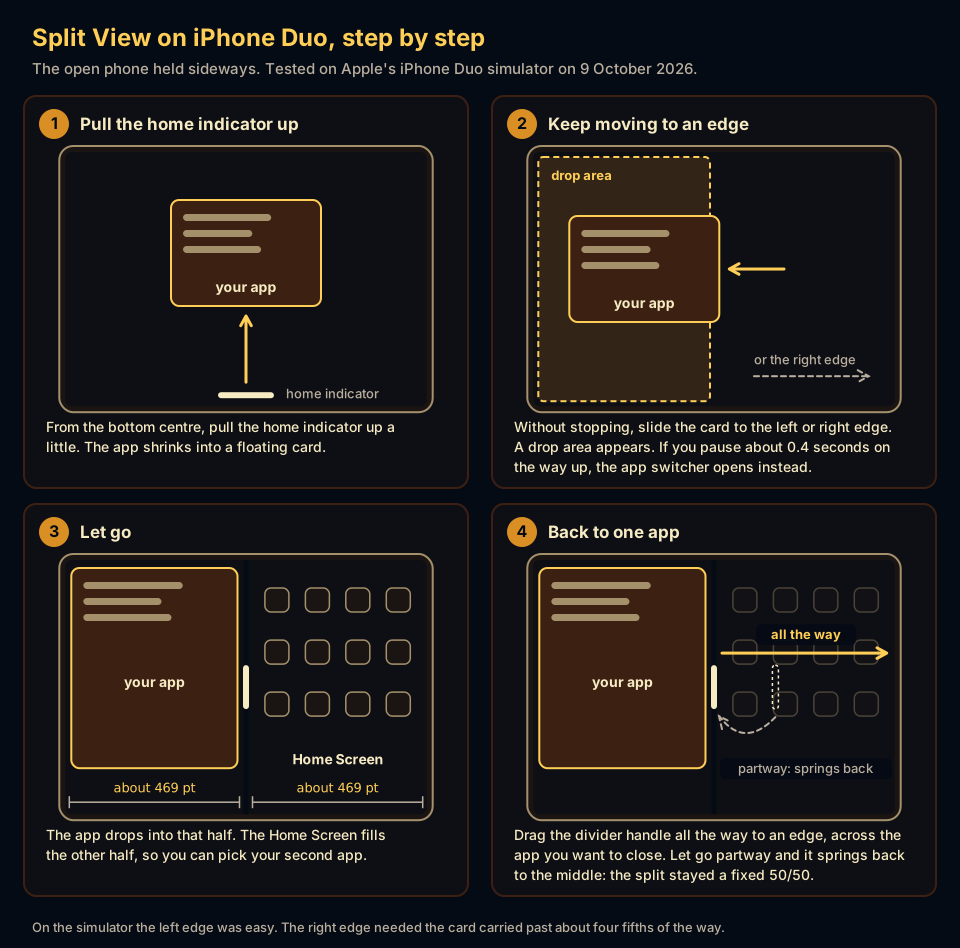

- Open the phone and turn it sidewaysStart in the app you want on one side. Split View lives on the inner screen, so unfold iPhone Duo and hold it in landscape.
- Pull the home indicator upThe home indicator is the short bar at the bottom centre of the screen. Pull it up a little and the app shrinks into a floating card.
- Keep moving to an edgeWithout stopping, slide the card to the left or right edge of the screen.
- Let goThe app drops into that half. The Home Screen fills the other half.
- Pick the second appApple says you then launch a second app on the other side. On the simulator, the Home Screen was waiting in that half to choose from.
Why does the app switcher open instead?
The app switcher opens when the gesture looks like a pause rather than a slide. On the simulator, stopping for about 0.4 seconds on the way up opened the app switcher instead of Split View. So pull up and move sideways in one motion, the way you would slide a card across a table.
The other cause we hit was stopping short on the right. If the switcher opens, go back to your app and try again, and carry the card a little further toward the right edge than feels natural before you let go.
Can you resize the two halves?
No, not on the simulator. Apple has not documented a resizable divider, and MacRumors reported on 23 September 2026 that the split is a fixed 50/50, citing Apple's marketing material. On 9 October we dragged the divider to about one third and to about two thirds of the screen. Both times it sprang back to the middle.
That is the main tradeoff. On an iPad you can give one app more of the screen. In what we saw on iPhone Duo, each app got half of the 7.6-inch inner display, about 469 points wide by our measurements, and the one thing the divider did for us was end Split View. Apple tells app makers to handle 'dynamic window sizes' in side-by-side multitasking, so check Apple's own user guide once it covers iPhone Duo.
How do you get one app back to full screen?
Drag the handle on the divider in the middle of the screen all the way to an edge. Push it across the app you want to close, and the other app gets the whole screen back. That worked for us on the simulator in both directions. Apple had not written down an exit gesture by 9 October 2026.

| You do this | What happens | Where it comes from |
|---|---|---|
| Pull the home indicator up a little | The app shrinks into a floating card | Our simulator test, and Apple's developer talk |
| Slide the card to the left or right edge and let go | The app drops into that half, and the Home Screen fills the other half | Our simulator test, and Apple's announcement |
| Pause for about 0.4 seconds on the way up | The app switcher opens instead | Our simulator test only |
| Drag the middle divider all the way to an edge | The app on the other side gets the whole screen back | Our simulator test only |
Where do an app's buttons go in each half?
On iPhone Duo, toolbars and tab bars sit in a column down the side of the screen, and in Split View each app puts that column on its own outer edge. Apple's design guidelines say the left app has controls on the left. The right app keeps its column on the right, next to the status bar.
When two apps share the inner display with Split View multitasking, each one places controls along its outer edge, so the left app has controls on the left.
Apple Human Interface Guidelines, Designing for iPhone Duo
Apple also asks app makers to keep content clear of the column on the other edge, because an app can land on either side. Older apps still take part. Apple's developer talk says all apps participate in multitasking on iPhone Duo, and an app that supports only one orientation scales to fit the inner display, Split View included.
How does Chonky Corgo fit in each half?
We make Chonky Corgo, so here is our own app in Split View, weak spot included. Chonky Corgo's iPhone Duo layouts are in testing for version 2.1. On 9 October 2026 the App Store served version 2.0.0, which came out before Apple accepted iPhone Duo builds and does not use the full open screen.

- In the right half, Chonky Corgo's column of tabs, Back button and Rewards bell stays on the right edge under the status bar, the same place it sits full screen.
- In the left half, the column moves to the left edge, as Apple's guidelines ask.
- Our weak spot: in our current test build, 2.1.0 (42), the left half drew the column's buttons too far in, over the edge of the page, and a swipe back from the screen edge started on the column and did nothing. We found both on the simulator on 9 October and fixed them the same day, but those fixes are not in build 42.
Full screen and held sideways, version 2.1 shows two pages side by side, such as the battle beside your day, and a screen with one page gets a window onto Chonky's town, Pawville. Playtime adds 11 small toys you play by folding the phone. All of that was in testing on 9 October, not on the App Store. Our poses guide shows what the game does in each of the other ways to hold the phone.
What has Apple not said about Split View yet?
Apple's pages leave several things open on 9 October 2026. Apple's announcement does not mention a third app, a floating window or a resizable divider, and no Apple page we read describes an exit gesture. What happens to a pair of apps when you close the phone is not documented either.
One limit is documented. Apple's developer talk on multiple displays says an app cannot open a new window on the outer display, because that is kept for the inner display. Everything in this guide happens on the open phone. Check Apple's iPhone user guide once it covers iPhone Duo.
What else do people ask?
Three questions people ask once they have two apps on screen. The answers come from Apple's announcement, iPhone Duo page and developer talks, read on 9 October 2026, plus what we saw on the simulator. Apple's own user guide may say more once it covers iPhone Duo.
- Does Split View work with iPhone Duo closed?
- Apple describes Split View on the open phone's inner display, and we found no Apple page that describes it on the closed phone. Apple's developer talk also says apps cannot open new windows on the outer display, which is kept for the inner display.
- Can you open two Safari windows side by side on iPhone Duo?
- Apple says yes. The iPhone Duo announcement says you can launch a second window of the same app, like Safari, for comparison shopping. That comes from Apple's announcement. We did not test two Safari windows on the simulator.
- Do apps need an update to work in Split View?
- No. Apple's developer talk says all apps participate in multitasking on iPhone Duo, and an app that supports only one orientation scales to fit. Apple asks app makers to build apps that resize, so updated apps should fill their half more cleanly.