
iPhone Duo
12 things to try on your first day with iPhone Duo
Short answer: try every pose. Use it closed with the buttons down the side, open it to two Home Screen pages, run two apps in Split View, pin a video, then fold it like a book. Stand it up for StandBy and hands-free FaceTime. Save Duo Preview, Kid Cue and Smart Take for friends. Items 1 to 11 come from Apple. Item 12 is our own game.
iPhone Duo goes on sale on 23 October 2026, and the first hour with any folding phone goes the same way: you open it, close it, half fold it and watch what moves. This list skips the guessing. Items 1 to 11 are system features Apple describes on its iPhone Duo page, in its 9 September announcement, in its design guidelines and in its developer talks, which we read on 9 October 2026.
Two honest notes before you start. We wrote this before anyone could buy an iPhone Duo, so nothing here is a hands-on verdict. Each item is what Apple says the feature does, plus the pose you need for it. And we make Chonky Corgo, a walking game. Item 12 is our game, we put it on the list ourselves, and its iPhone Duo version was still in testing when we checked.
What are the 12 things to try on iPhone Duo?
Here is the whole list in one place. Items 1 and 2 are for the closed phone, 3 to 5 for the open screen, 6 and 7 for a half fold, 8 and 9 for standing it up, and 10 and 11 for the camera. Item 12 is our game. Each row names the pose and who describes it.
| # | Try this | How to hold it | Who describes it |
|---|---|---|---|
| 1 | Find the buttons down the side | Closed | Apple's announcement and design guidelines |
| 2 | Open it in the middle of something | Closed, then open | Apple's announcement |
| 3 | See two Home Screen pages at once | Open | Apple's announcement |
| 4 | Run two apps side by side | Open | Apple's iPhone Duo page and announcement |
| 5 | Pin a video to the top | Open, upright | Apple's iPhone Duo page and design talk |
| 6 | Fold it like a book | Half folded | Apple's design guidelines and design talk |
| 7 | Set it down like a laptop | Half folded on a table | Apple's iPhone Duo page |
| 8 | Use StandBy without a charger | Standing | Apple's announcement and iPhone Duo page |
| 9 | Take a FaceTime call hands-free | Standing or propped up | Apple's iPhone Duo page and announcement |
| 10 | Let your subject see the shot | Open, rear cameras facing them | Apple's iPhone Duo page and announcement |
| 11 | Get in the photo with Smart Take | Propped up | Apple's announcement |
| 12 | Fold a corgi in Chonky Corgo (ours) | Open, then fold | Our own test build, 2.1.0 (42) |
What changes when iPhone Duo is closed?
Closed, iPhone Duo has a 5.4-inch screen that is wider and shorter than other iPhones, so iOS 27 moves the bars out of the way. Apple says Lock Screen controls, the Dock and each app's buttons now sit down the right side, which leaves more height for whatever you are reading or watching.
1. Find the buttons down the side
On the closed iPhone Duo, the column on the right is where everything lives. Apple says the Dynamic Island now runs down that side and grows when a Live Activity or an alert arrives, and the status bar becomes a small circular cluster tucked into the corner. In an updated app, Back sits at the top of the column and the other buttons follow below it. Apple's design guidelines add one nice detail: the column stays on the same side in right-to-left languages, because it lines up with the hardware.

2. Open it in the middle of something
Start an email on the closed screen, then open the phone. Apple says iOS 27 content reacts as the phone folds, turns when you rotate it, and moves to the right screen when you flip the phone over. Apple's guidelines use Mail as the example: closed, it shows your list or one email, and open, it shows both side by side. Not every app keeps up yet. Apps built with an older SDK sit in the middle of the open screen with space around them, as our list of apps with confirmed iPhone Duo support explains.
What can you do with the big inner screen?
Open, iPhone Duo has a 7.6-inch screen, which Apple says is 50 percent larger than the iPhone 18 Pro Max screen. Three things show off that space on day one: two Home Screen pages at once, two apps side by side in Split View, and a video pinned to the top while you use another app.
3. See two Home Screen pages at once
Apple's announcement says the open screen shows two Home Screen pages, with Today View on the left. Today View is the scrolling list of widgets you swipe to on other iPhones. In Apple's iPhone Duo simulator, held sideways, those widgets sat in a column right on the first page, as on an iPad. Held upright, they stayed one swipe to the left. Either way, the open screen has room for more of them, so spend five minutes choosing which widgets earn a spot.
4. Run two apps side by side
Apple says Split View lets you open two apps side by side on iPhone for the first time. In Apple's design talk, you start it by dragging an app to the side of the screen. Apple's own example is browsing Photos on one side and dragging a picture into Mail on the other. You can also open a second Safari window to compare two shops. Our Split View guide has the exact gesture, what we saw on the simulator and how to get back to one app.
5. Pin a video to the top
Hold the open phone upright and start a video in picture in picture. Apple says you can pin it to the top of the screen and keep watching while you use another app, which shrinks to fit the space below. Then fold the phone partway: Apple's design talk says the video grows to fill half the screen, and the app below adjusts in real time.
What happens when you fold it halfway?
Half folded, the screen curves through the middle, and iOS 27 treats that curve as a divider. Apple says text and images shift away from it, and buttons, alerts, menus and sheets move aside so you never have to tap into the crease. Apple's Notes resizes its two panes so neither one sits in the fold.
6. Fold it like a book
Hold the phone sideways, half folded like a paperback, and open Notes or Settings. Apple's guidelines say split views like these adjust their width so both sides stay clear of the fold. We tried the system screens in Apple's own iPhone Duo simulator on 5 October 2026, and the search keyboard did something we liked: in this pose it split into two halves, one on each side of the fold. In the same pose, the Settings sidebar widened so it ended exactly at the fold. Our poses guide covers what changes in each of the seven ways to hold it.

7. Set it down like a laptop
Apple calls this pose Seated: half fold the phone and set it on a table with the inner screen facing you. Apple's iPhone Duo page pitches it for watching a show or following a workout, with the controls on the bottom half. Apple's design talk explains why: the top half is easier to see from a distance, and the bottom half rests on the table, so it is a steadier place to tap. Apple leaves this layout up to each app, so expect some apps to do nothing special here.

How do you use iPhone Duo standing up?
Stand iPhone Duo on its edges, which Apple calls Standing, and it becomes a small display that holds itself up. Apple says it then goes into StandBy on either screen, even off the charger, and that it can hold a FaceTime call for you. Try both on a desk or nightstand on day one.
8. Use StandBy without a charger
On other iPhones, Apple's guide says StandBy starts when the phone is charging and lying on its side. Apple's announcement says iPhone Duo enters StandBy on the outer or inner screen when you set it down, even when it is not charging. It can be a clock, a photo frame or a page of widgets. New Calendar and Weather faces join them. The tradeoff: off the charger, StandBy runs on your battery, and Apple gives no figure for how much it uses.
9. Take a FaceTime call hands-free
Apple says iPhone Duo can stand on its own, so you can take FaceTime calls without holding up the phone. The FaceTime camera hides under the inner screen until you need it, and Apple says it records 1080p video. If someone is in the room with you, Duo FaceTime lets them join the call on the outer screen and its camera, so nobody has to lean in. Apple's iPhone Duo Folio case adds a kickstand for more angles, if standing it on its edges does not suit your desk.
Which camera tricks are only on iPhone Duo?
Apple names three camera features that no other iPhone has: Duo Preview, Kid Cue and Smart Take. The first two use the outer screen, which faces the people you are photographing when you shoot with the rear cameras. Smart Take shoots by itself when everyone is ready.
10. Let your subject see the shot
With Duo Preview, the outer screen shows a live preview to whoever you are photographing, so they can fix their pose before you shoot. Turn the phone around and it works for you too: Apple says you can take a selfie with the 48MP rear cameras and check the shot on the outer screen. Kid Cue is the version for small children. It plays Peanuts animations on the outer screen to pull their eyes toward the lens.
11. Get in the photo with Smart Take
Smart Take is for the person who always ends up behind the camera. Apple says on-device AI models analyze the scene in real time and take the photo when the people in it are posing, so you no longer race the self-timer. Because iPhone Duo stands on its own, Apple also suggests propping it up for a long time-lapse, in 4K, without a tripod.
Can you play with the fold itself?
Yes. Apple lets apps watch the hinge angle as it changes, and its developer talk shows that powering interactive effects. Our own game is one way to try it on day one. We make Chonky Corgo, so read item 12 as our pitch rather than a neutral pick, and note the weakness at the end of it.
12. Fold a corgi in Chonky Corgo (ours)
Chonky Corgo is our walking RPG. In version 2.1, which was in testing on 9 October 2026, Playtime on the Home tab has 11 small toys you play by folding the phone. Fold to pull back the Bread Catapult and open to throw. Each pleat of the Squeezebox plays the next of 12 notes. Fold Bedtime and the blanket comes up as Chonky dozes off. Rewards in the inbox also open in a treasure chest whose lid follows the hinge. The toys are just for fun: they give nothing and save nothing. On other iPhones you play them with a slider.
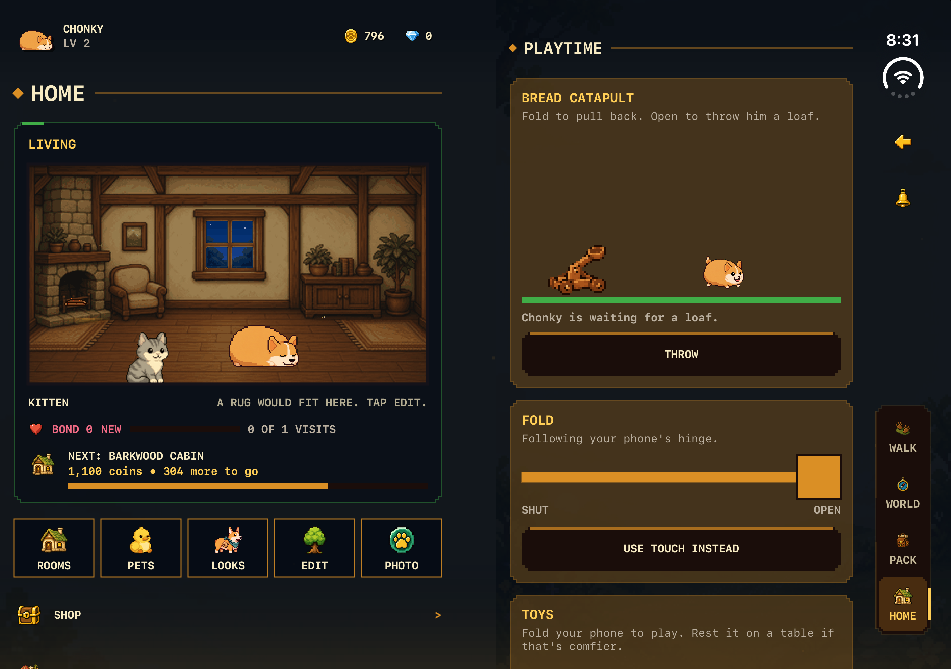
The weakness is plain. On 9 October 2026 the App Store version was 2.0.0, released on 30 September, before Apple accepted iPhone Duo builds, so it does not use the full open screen and has none of these toys. The game had no App Store ratings yet. Check the version on the App Store page before you look for Playtime. For other games that use the hinge, such as Twofold and kami, see our list of iPhone Duo games. For the game itself, what a walking RPG is explains the genre.
What did we leave out, and what is still unknown?
We left out anything Apple has not described. On 9 October 2026, Apple's online iPhone User Guide had no iPhone Duo pages, and its StandBy page still said to charge the phone and lay it on its side. So the iPhone Duo details above come from Apple's announcement, product page, design guidelines and developer talks.
- Siri AI works beside other apps in Split View, but Apple says it is in beta, in English to start, and not at first in the EU.
- Apple Pencil (USB-C) support was listed as coming later in 2026 on Apple's page in October, so it was not a day-one thing to try.
- Battery life in StandBy off the charger has no published number. Apple's figures are for video: up to 44 hours on the outer screen and up to 31 hours on the inner one.
What else do people ask?
Three quick questions that come up on the first day. The answers come from Apple's iPhone Duo page, its 9 September 2026 announcement and its iPhone User Guide, read on 9 October 2026. Apple can change features with software updates, so check the date at the top of this page first.
- Does StandBy on iPhone Duo need a charger?
- No. Apple's announcement says iPhone Duo enters StandBy on the outer or inner screen even when it is not charging. On other iPhones, Apple's guide says StandBy starts when the phone is charging and lying on its side.
- Can iPhone Duo run two apps at once?
- Yes, on the open inner screen. Apple says Split View lets you open two apps side by side on iPhone for the first time, open two windows of one app such as Safari, and save pairs of apps to come back to later.
- Does iPhone Duo have Face ID?
- No. Apple says iPhone Duo uses Touch ID in the side button, so you unlock it the same way whether it is open or closed. Apple also says you can unlock it with an Apple Watch.